- Welcome to AlomWare Toolbox Forum.
Recent posts
#21
Help and Support / Re: Variables
Last post by Paul (Lead Developer) - October 17, 2026, 08:23:08 PMHi Oblivion. I replied to your email. For others reading this topic, it was a bug introduced with v6.0.0.0 for the "String: Assign to variable" step, which has now been fixed for the next release. Thanks for drawing my attention to it! 
#22
Help and Support / Re: Variables
Last post by oblivion - October 15, 2026, 11:46:56 PMThat's helpful, thanks.
However... trying to write code that will effectively maintain two different copies of data$, each held in variables I've created, where a decision about which variable to move into data$, modify and then move back to the variable is just failing miserably. Looking at debug output, I seem to be making multiple identically-named variables rather than just one with variable content. Are variables local to blocks and, if so, is it possible to make them local to the entire action so they can be shared between decision blocks?
However... trying to write code that will effectively maintain two different copies of data$, each held in variables I've created, where a decision about which variable to move into data$, modify and then move back to the variable is just failing miserably. Looking at debug output, I seem to be making multiple identically-named variables rather than just one with variable content. Are variables local to blocks and, if so, is it possible to make them local to the entire action so they can be shared between decision blocks?
#23
Help and Support / Re: Variables
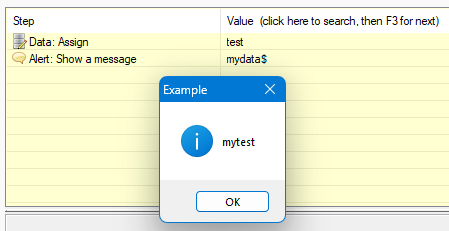
Last post by Paul (Lead Developer) - October 13, 2026, 07:15:15 PMThe data$ variable is just a holder for any text (like string$). You can use either, but only string$ can be modified with the String steps. Don't use a variable name with "data$" in it (like "mydata$"), because Toolbox will match the "data$" value first when running a step, like so:
Which results in a message like this:
Code Select
(Start)
HOW TO USE: Copy from Start to End, and then paste into an action.
REFERENCE : See an example of pasting at alomware.com/paste.png
0001 Data: Assign "test"
0002 Alert: Show a message "mydata$"
(End)
Which results in a message like this:
#24
Help and Support / Variables
Last post by oblivion - October 13, 2026, 06:53:50 AMIs there anything intrinsically different about the data$ variable from -- say -- string$ or a user-created variable?
Let's say I wanted to use the Data: Add function to move stuff into data$ but I wanted to use Data: Add to modify different variables, if I used string$ or mydata$ to hold a copy of a data$ variable I'd previously created while I messed with another version of data$, would anything break?
Let's say I wanted to use the Data: Add function to move stuff into data$ but I wanted to use Data: Add to modify different variables, if I used string$ or mydata$ to hold a copy of a data$ variable I'd previously created while I messed with another version of data$, would anything break?
#25
Feature Requests / Re: Action list
Last post by Paul (Lead Developer) - October 12, 2026, 08:18:39 PMThank you both for your kind words. I truly appreciate the... appreciation. 
#26
Feature Requests / Re: Action list
Last post by oblivion - October 11, 2026, 08:24:02 PMPhteven and GCRedditor136 -- you've absolutely nailed it.
Once the tooldata$ variable is implemented in the main release, I'm going to put my current version of the action up, with lots of explanation and so on, as a tutorial in the Tips section. It's been a useful learning exercise for me so hopefully that'll apply to other people too!
Once the tooldata$ variable is implemented in the main release, I'm going to put my current version of the action up, with lots of explanation and so on, as a tutorial in the Tips section. It's been a useful learning exercise for me so hopefully that'll apply to other people too!
#27
Feature Requests / Re: Action list
Last post by Phteven - October 11, 2026, 06:20:27 PMHi everyone. I've been watching this software and forum as a while now as a guest lurker and decided to bite the bullet and pay for an unlock code today, based literally on what I saw in this topic. What GCRedditor136 said is true: I wanted a software that was current, supported, and updated. Amazingly, Paul responded to my payment within an hour with my unlock code, and even asked me if I had any questions. I've never experienced such one-to-one support like this in all my years of software ownership! Usually you don't hear back from a company until days later (if at all) so I'm very happy and can recommend AlomWare Toolbox to anyone reading this.👍
#28
Feature Requests / Re: Action list
Last post by GCRedditor136 - October 11, 2026, 11:08:31 AMI absolutely love the dedication of Paul to his users and the app. This topic demonstrates it so well: not only does he take the time to create an action AND screenshots to answer the user's question, but he also goes the extra mile and implements a new function (the "tooldata$" variable) to make it even easier for his user. It's a rare sight these days to see a software developer so caring and devoted like this. Thank you, Paul. I knew my purchase was in good hands.
#29
Tips and Tricks / Re: [Tip] Make the "Run" dialo...
Last post by Paul (Lead Developer) - October 10, 2026, 01:48:35 PMGood catch! I just added this for the next update, but it'll only work if AlomWare Toolbox is run as admin because the Task Manager is admin.
#30
Tips and Tricks / Re: [Tip] Make the "Run" dialo...
Last post by Xoannon - October 10, 2026, 11:36:14 AMI just saw today that the Run box from the Task Manager isn't wide when this setting is on. Can that be done?