- Welcome to AlomWare Toolbox Forum.
Recent posts
#61
Tips and Tricks / Re: [Tip] Create a QR code fro...
Last post by Paul (Lead Developer) - September 27, 2026, 12:50:36 PMAlomWare Toolbox only supports Model 1 and Model 2 QR Codes, as seen here: https://www.qrcode.com/en/codes/
I'll amend the step's description to explicitly state that. It won't be updated to support the other types. The "qr=" prefix just takes the text after with no regard to what type of text it is (website, plain text, phone number, email address, etc). It's up to the scanning app to determine the QR type and act accordingly.
I'll amend the step's description to explicitly state that. It won't be updated to support the other types. The "qr=" prefix just takes the text after with no regard to what type of text it is (website, plain text, phone number, email address, etc). It's up to the scanning app to determine the QR type and act accordingly.
#62
Tips and Tricks / Re: [Tip] Create a QR code fro...
Last post by oblivion - September 26, 2026, 09:35:23 PMCoincidentally, I have just started (slightly unwillingly!) getting interested in the mechanics or QR codes. It's a work thing, not a Toolbox thing, but I'm trying to find a way to (probably) capture and decode the QR codes on drug and related packages used in eye injections
sorry, anyone who's squeamish but I promise that's the only mention of such a thing
so that the batch number and expiry date of the injected drug can be captured and entered into the clinical system that needs to capture it. And, believe me, hand-typing those batch numbers -- as they're doing now -- does NOT look sustainable if we're interested in minimising errors!
So the very first QR code I try to work with is Weird. the usual "three squares with a blob in the middle" that are there on most QR codes you see ... aren't. It's small -- maybe a centimetre square, my phone can recognise it and decode it (but that's not helpful) and the barcode scanner I point at it can too, but returns a (slightly) different result.
That's probably not relevant either. But reading the handheld scanner manual, I find there's a LOT of different types of QR code. And this particular type -- whose orientation elements seem to just be a pair of lines on adjoining edges -- is what's sparked this comment.
Which is... is there something in the qr= element of Toolbox that automatically determines the most appropriate format of QR code to use, or is it one type only and if you need one of the weirder formats, you're going to need something else?
(I have no idea -- yet -- what makes a format appropriate or inappropriate. I'll probably know more when I get further into this piece of work, and I WILL stress that this is not a problem I'm asking for Toolbox's help with, just something that's sparked my interest relating to a problem that's going in the other direction completely!)
sorry, anyone who's squeamish but I promise that's the only mention of such a thing
so that the batch number and expiry date of the injected drug can be captured and entered into the clinical system that needs to capture it. And, believe me, hand-typing those batch numbers -- as they're doing now -- does NOT look sustainable if we're interested in minimising errors!
So the very first QR code I try to work with is Weird. the usual "three squares with a blob in the middle" that are there on most QR codes you see ... aren't. It's small -- maybe a centimetre square, my phone can recognise it and decode it (but that's not helpful) and the barcode scanner I point at it can too, but returns a (slightly) different result.
That's probably not relevant either. But reading the handheld scanner manual, I find there's a LOT of different types of QR code. And this particular type -- whose orientation elements seem to just be a pair of lines on adjoining edges -- is what's sparked this comment.
Which is... is there something in the qr= element of Toolbox that automatically determines the most appropriate format of QR code to use, or is it one type only and if you need one of the weirder formats, you're going to need something else?
(I have no idea -- yet -- what makes a format appropriate or inappropriate. I'll probably know more when I get further into this piece of work, and I WILL stress that this is not a problem I'm asking for Toolbox's help with, just something that's sparked my interest relating to a problem that's going in the other direction completely!)
#63
Tips and Tricks / Re: [Tip] Make the "Run" dialo...
Last post by oblivion - September 13, 2026, 10:19:50 PMAnd in conjunction with the tip to make the Run box open in the middle of the desktop, it's even more brilliant 
#64
Tips and Tricks / Re: New note gadget
Last post by Paul (Lead Developer) - September 13, 2026, 02:56:05 PMNice tip, Oblivion.
#65
Tips and Tricks / New note gadget
Last post by oblivion - September 12, 2026, 10:33:18 PMI just remembered a conversation I had (in the General area) a little while back, that resulted in Paul telling me that the next version of Toolbox would have the ability to create a new note from the content of the string$ variable.
And I've been meaning to try it out for a while, and kept forgetting.
So today's new toy: highlight some text, hit whatever your chosen trigger is (I'm using Alt-Win-N) and this will create a new note from the highlighted text and open the Notes tab of Toolbox so you can see it and maybe edit it further.
I've done some brief testing, it seems to work well for me. So, belated thanks to Paul for making this possible, and I can see it being useful to me, which might mean it'll be useful to other people too!
One general note, since I think faster machines can sometimes have problems with Keyboard: Copy "" -- if you try it and no new note is created, it might work better for you if you replace line 0002 with
0002 Macro: Type keys or use mouse "{z20}{ctrldown}c{ctrlup}{z20}"
And I've been meaning to try it out for a while, and kept forgetting.
So today's new toy: highlight some text, hit whatever your chosen trigger is (I'm using Alt-Win-N) and this will create a new note from the highlighted text and open the Notes tab of Toolbox so you can see it and maybe edit it further.
Code Select
(Start)
HOW TO USE: Copy from Start to End, and then paste into an action.
REFERENCE : See an example of pasting at alomware.com/paste.png
0001 Wait: For action hotkey to be released ""
0002 Keyboard: Copy ""
0003 String: Assign from clipboard text ""
0004 String: Create note ""
0005 Toolbox: Show the tab named "Notes"
(End)
I've done some brief testing, it seems to work well for me. So, belated thanks to Paul for making this possible, and I can see it being useful to me, which might mean it'll be useful to other people too!
One general note, since I think faster machines can sometimes have problems with Keyboard: Copy "" -- if you try it and no new note is created, it might work better for you if you replace line 0002 with
0002 Macro: Type keys or use mouse "{z20}{ctrldown}c{ctrlup}{z20}"
#66
Solutions / NUM LOCK issue
Last post by Paul (Lead Developer) - September 08, 2026, 11:41:57 AMQuestion: NUM LOCK issue
"I just cannot get [my PC] to leave the NUM LOCK function as set to ON permanently."
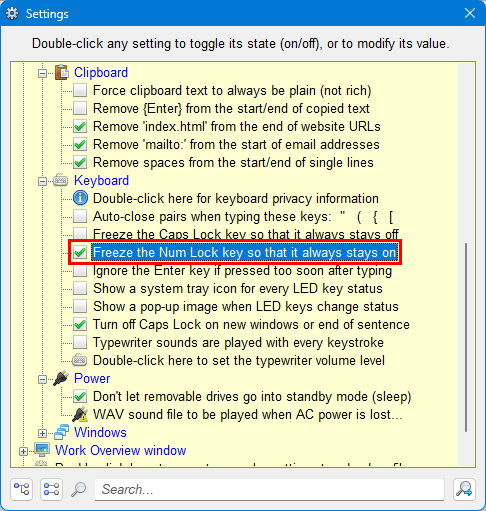
This user has tried everything to get his PC to keep the Num Lock key on, but nothing worked. AlomWare Toolbox has a setting to force it on at all times. Once enabled, you can press Num Lock to turn it off, but it'll stay on regardless. Just open Toolbox's "Settings" and navigate to "Tweaks for your PC > Keyboard > Freeze the Num Lock key so that it always stays on".
"I just cannot get [my PC] to leave the NUM LOCK function as set to ON permanently."
This user has tried everything to get his PC to keep the Num Lock key on, but nothing worked. AlomWare Toolbox has a setting to force it on at all times. Once enabled, you can press Num Lock to turn it off, but it'll stay on regardless. Just open Toolbox's "Settings" and navigate to "Tweaks for your PC > Keyboard > Freeze the Num Lock key so that it always stays on".
#67
Bug Reports / Re: Missed event notifications
Last post by Paul (Lead Developer) - September 06, 2026, 08:56:04 PMImages for posting here need to be linked from Imgur.com or some other image host. I didn't enable attachments so as to keep the forum database small.
#68
Bug Reports / Re: Missed event notifications
Last post by oblivion - September 06, 2026, 08:40:34 PMIn email. Images seem only to be allowed to be web-based, here.
#69
Tips and Tricks / Re: [Tip] Create a QR code fro...
Last post by Paul (Lead Developer) - September 06, 2026, 05:45:16 PMSorry, I forgot to enable that.  The next release (v9.0.0.1 tomorrow) will allow text of up to 2048 characters (2 KB) to be converted into a QR code.
The next release (v9.0.0.1 tomorrow) will allow text of up to 2048 characters (2 KB) to be converted into a QR code. #70
Tips and Tricks / Re: [Tip] Create a QR code fro...
Last post by GCRedditor136 - September 06, 2026, 04:10:54 PMHow do I use this with any text (like you said)? It seems to only accept websites.